Application
The Application custom resource lets you add your company or application branding to the customer-facing UI, including a custom title and icon. Depending on which Replicated installer the customer uses, this UI is either the Embedded Cluster v3 install and upgrade wizard or the Replicated Admin Console.
For Replicated installers that enable the Admin Console, the Application custom resource also lets you configure other aspects of the Admin Console user experience. This includes setting a minimum required KOTS version, adding custom graphs with Prometheus to the dashboard, and more.
Example
The following is an example manifest file for the Application custom resource:
apiVersion: kots.io/v1beta1
kind: Application
metadata:
  name: your-application
spec:
  title: Your Application
  icon: https://support.io/img/logo.png
  releaseNotes: ""
  allowRollback: true
  targetKotsVersion: "1.130.2"
  minKotsVersion: "1.124.5"
  requireMinimalRBACPrivileges: true
  additionalImages:
    - jenkins/jenkins:lts
  excludedImages:
    - auto
  additionalNamespaces:
    - "*"
  ports:
    - serviceName: web
      servicePort: 9000
      localPort: 9000
      applicationUrl: "http://web"
  statusInformers:
    - deployment/my-web-svc
    - deployment/my-worker
  graphs:
    - title: User Signups
      query: 'sum(user_signup_events_total)'
Spec
title
The title to use in the customer-facing UI. Typically, this is the application name.
Limitation
The title property doesn't support Go templating.
Example
apiVersion: kots.io/v1beta1
kind: Application
metadata:
  name: outline-app
spec:
  title: Outline
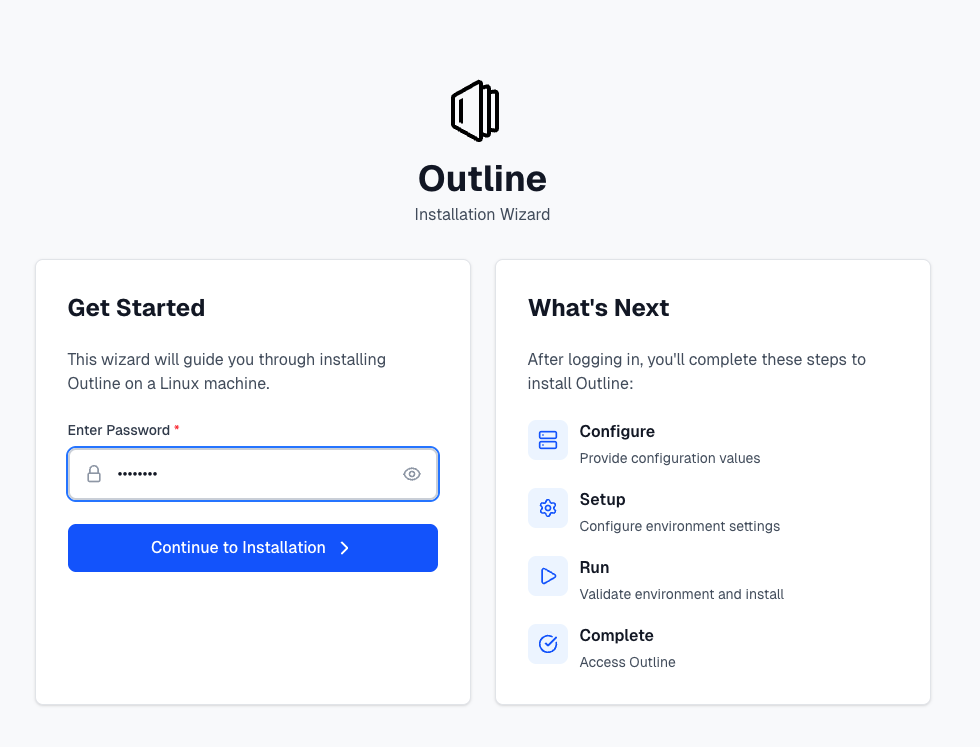
View a larger version of this image
icon
A file with the icon to use in the customer-facing UI. Typically, this is the application's logo.
The icon can be a remote URL or a Base64 encoded image. Air gap installations require Base64 encoded images.
Limitation
The icon property doesn't support Go templating.
Examples
Remote URL
apiVersion: kots.io/v1beta1
kind: Application
metadata:
  name: your-application
spec:
  icon: https://support.io/img/logo.png
Base64-encoded image
apiVersion: kots.io/v1beta1
kind: Application
metadata:
  name: your-application
spec:
  icon: data:image/svg+xml;base64,PHNy4xMDwM...# based64-encoded image
releaseNotes
The release notes for this application version. You can also set the release notes from the Vendor Portal or Replicated CLI when you promote a release.
Limitation
The releaseNotes property doesn't support Go templating.
Example
apiVersion: kots.io/v1beta1
kind: Application
metadata:
  name: your-application
spec:
  releaseNotes: Fixes a bug and adds a new feature.
allowRollback
Enable this flag to create a Rollback button on the Admin Console Version History page. By default, allowRollback is false.
If your application does not introduce backwards-incompatible versions, such as through database migrations, you can use allowRollback. This flag lets end users roll back to previous versions from the Admin Console.
Rollback does not revert any state. Rather, it recovers the YAML manifests applied to the cluster.
Limitations
- The
allowRollbackproperty doesn't support Go templating. - Embedded Cluster v3 doesn't support the
allowRollbackproperty. - Embedded Cluster v2 supports rolling back the application version only. It doesn't support rolling back the Embedded Cluster version. Users can roll back to an earlier application version only when the Embedded Cluster version stays the same. For example, after upgrading to 1.1.0, users can roll back to version 1.0.0 only if both 1.0.0 and 1.1.0 use the same Embedded Cluster version.
Example
apiVersion: kots.io/v1beta1
kind: Application
metadata:
  name: your-application
spec:
  allowRollback: true
additionalNamespaces
An array of additional namespaces as strings for KOTS to create in the cluster. For more information, see Defining Additional Namespaces.
In each additional namespace, KOTS creates the application secret.
KOTS ensures that the application secret can pull all application images. This includes images in use and any images that you add in the additionalImages property.
This pull secret is automatically added to all manifest files that use private images.
For dynamically created namespaces, specify "*".
Limitations
- The
additionalNamespacesproperty doesn't support Go templating. - Embedded Cluster v3 doesn't support the
additionalNamespacesproperty.
Example
apiVersion: kots.io/v1beta1
kind: Application
metadata:
  name: your-application
spec:
  additionalNamespaces:
    - "*"
additionalImages
An array of strings that reference images to include in air gap bundles and push to the local registry during installation.
KOTS detects images from the PodSpecs in the application. Some applications, such as Operators, might need to include additional images that are not referenced until runtime. For more information, see Defining Additional Images.
Limitations
- The
additionalImagesproperty doesn't support Go templating. - Embedded Cluster v3 doesn't support the
additionalImagesproperty.
Example
apiVersion: kots.io/v1beta1
kind: Application
metadata:
  name: your-application
spec:
  additionalImages:
    - jenkins/jenkins:lts
excludedImages
An array of strings that reference images to exclude from air gap bundles.
Limitations
- The
excludedImagesproperty doesn't support Go templating. - Embedded Cluster v3 doesn't support the
excludedImagesproperty.
Example
apiVersion: kots.io/v1beta1
kind: Application
metadata:
  name: your-application
spec:
  excludedImages:
    - auto # This image does not exist but is imported by the Istio Gateway chart
requireMinimalRBACPrivileges
When true, requireMinimalRBACPrivileges requires minimal role-based access control (RBAC) for KOTS. When set to true, KOTS creates a namespace-scoped Role and RoleBinding instead of the default cluster-scoped ClusterRole and ClusterRoleBinding. By default, requireMinimalRBACPrivileges is false.
For additional requirements and limitations related to using namespace-scoped RBAC, see About Namespace-scoped RBAC in Configuring KOTS RBAC.
Limitations
- The
requireMinimalRBACPrivilegesproperty doesn't support Go templating. - Supported for KOTS existing cluster installations only. Embedded Cluster doesn't support the
requireMinimalRBACPrivilegesproperty.
Example
apiVersion: kots.io/v1beta1
kind: Application
metadata:
  name: your-application
spec:
  requireMinimalRBACPrivileges: true
supportMinimalRBACPrivileges
Allows minimal role-based access control (RBAC) for all customer installations. When set to true, KOTS supports creating a namespace-scoped Role and RoleBinding instead of the default cluster-scoped ClusterRole and ClusterRoleBinding. By default, supportMinimalRBACPrivileges is false.
Minimal RBAC is not used by default. KOTS uses minimal RBAC only when you pass the --use-minimal-rbac flag to the kots install command.
For additional requirements and limitations related to using namespace-scoped RBAC, see About Namespace-scoped RBAC in Configuring KOTS RBAC.
Limitations
- The
supportMinimalRBACPrivilegesproperty doesn't support Go templating. - Supported for KOTS existing cluster installations only. Embedded Cluster doesn't support the
supportMinimalRBACPrivilegesproperty.
Example
apiVersion: kots.io/v1beta1
kind: Application
metadata:
  name: your-application
spec:
  supportMinimalRBACPrivileges: true
ports
Extra ports, in addition to the 8800 Admin Console port, that are port-forwarded when running the kubectl kots admin-console command. With ports specified, KOTS can establish port forwarding to simplify connections to the deployed application. When the application starts and the service is ready, the KOTS CLI prints the URL to access the port-forwarded service. For more information, see Port Forwarding Services with KOTS.
KOTS does not automatically create port forwards for installations on VMs or bare metal servers with Replicated Embedded Cluster or Replicated kURL. This is because it cannot be verified that the ports are secure and authenticated. Instead, Embedded Cluster or kURL creates a NodePort service to make the Admin Console accessible on a port on the node (port 8800 for kURL or port 30000 for Embedded Cluster).
You can expose additional ports on the node for Embedded Cluster or kURL installations by creating NodePort services. For more information, see Exposing Services Using NodePorts.
The ports key has the following fields:
ports.serviceName: The name of the service that receives the traffic.ports.servicePort: ThecontainerPortof the Pod where the service is running.ports.localPort: The port to map on the local workstation.(Optional)
ports.applicationUrl: When set to the same URL that is specified in thedescriptor.links.urlfield of the Kubernetes SIG Application custom resource, KOTS adds a link on the Admin Console dashboard where the given service can be accessed. This process automatically links to the hostname in the browser (where the Admin Console is being accessed) and appends the specifiedlocalPort.If not set, then the URL defined in the
descriptor.links.urlfield of the Kubernetes SIG Application is linked on the Admin Console dashboard.
Ensure that you use the containerPort and not the servicePort. The containerPort and servicePort are often the same port, though it is possible that they are different.
For more information about adding links to port-forwarded services, see Add a Link to a Port-Forwarded Service in the Admin Console.
Limitations
- KOTS supports Go templates in the
ports.serviceNameandports.applicationUrlfields only. Using Go templates in theports.localPortorports.servicePortfields results in an installation error similar to the following:json: cannot unmarshal string into Go struct field ApplicationPort.spec.ports.servicePort of type int. - Embedded Cluster v3 doesn't support the
portsproperty or port-forwarding services with KOTS.
Example
apiVersion: kots.io/v1beta1
kind: Application
metadata:
  name: your-application
spec:
  ports:
    - serviceName: web
      servicePort: 9000
      localPort: 9000
      applicationUrl: "http://web"
statusInformers
Resources to watch and report application status back to the user. When you include statusInformers, the dashboard can indicate when the application deployment is complete and the application is ready for use.
statusInformers use the format [namespace/]type/name, where namespace is optional.
For more information about including statusInformers, see Enable and understand application status.
Limitation
Embedded Cluster v3 doesn't support the statusInformers property. For Embedded Cluster v3 installations, the Replicated SDK automatically detects and reports the status of resources in your application Helm charts. You can also override the list of resources that get reported on using the SDK's statusInformers value. See Enable application status insights.
Examples
Plain text
apiVersion: kots.io/v1beta1
kind: Application
metadata:
  name: your-application
spec:
  statusInformers:
    - deployment/my-web-svc
    - deployment/my-worker
Go templating
The following example shows excluding a specific status informer based on a user-supplied value from the Admin Console Configuration screen:
apiVersion: kots.io/v1beta1
kind: Application
metadata:
  name: your-application
spec:
  statusInformers:
    - deployment/my-web-svc
    - '{{repl if ConfigOptionEquals "option" "value"}}deployment/my-worker{{repl else}}{{repl end}}'
graphs
For installations with KOTS in existing cluster, graphs defines custom graphs to include on the Admin Console dashboard. For more information about how to create custom graphs, see Adding Custom Graphs.
The graphs key has the following fields:
graphs.title: The graph title.graphs.query: The Prometheus query.graphs.legend: The legend to use for the query line. You can use Prometheus templating in thelegendfields with each element returned from the Prometheus query. The template escape sequence is{{}}. Use{{ value }}. For more information, see Template Reference in the Prometheus documentation.graphs.queries: A list of queries containing aqueryandlegend.graphs.yAxisFormat: The format of the Y axis labels with support for all Grafana units. For more information, see Visualizations in the Grafana documentation.graphs.yAxisTemplate: Y axis labels template.
Limitation
Embedded Cluster doesn't support the graphs property.
Example
apiVersion: kots.io/v1beta1
kind: Application
metadata:
  name: your-application
spec:
  graphs:
    - title: User Signups
      query: 'sum(user_signup_events_total)'
proxyRegistryDomain (Deprecated)
proxyRegistryDomain is deprecated. For information about how to use a custom domain for the Replicated proxy registry, see Use Custom Domains.
The custom domain used for proxy.replicated.com. For more information, see Using Custom Domains.
Limitation
The proxyRegistryDomain property doesn't support Go templating.
Example
apiVersion: kots.io/v1beta1
kind: Application
metadata:
  name: your-application
spec:
  proxyRegistryDomain: "proxy.yourcompany.com"
replicatedRegistryDomain (Deprecated)
replicatedRegistryDomain is deprecated. For information about how to use a custom domain for the Replicated registry, see Use Custom Domains.
The custom domain used for registry.replicated.com. For more information, see Using Custom Domains.
Limitation
The replicatedRegistryDomain property doesn't support Go templating.
Example
apiVersion: kots.io/v1beta1
kind: Application
metadata:
  name: your-application
spec:
  replicatedRegistryDomain: "registry.yourcompany.com"
targetKotsVersion
For KOTS existing cluster installations, targetKotsVersion specifies the version of KOTS to use. For more information, see Setting Minimum and Target Versions for KOTS.
Limitations
- The
targetKotsVersionproperty doesn't support Go templating. - Embedded Cluster doesn't support the
targetKotsVersionproperty. To avoid installation failures, do not usetargetKotsVersionin releases that support installation with Embedded Cluster. For more information, see Setting Minimum and Target Versions for KOTS.
Example
apiVersion: kots.io/v1beta1
kind: Application
metadata:
  name: your-application
spec:
  targetKotsVersion: "1.130.2"
minKotsVersion (Beta)
For KOTS existing cluster installations, minKotsVersion sets the minimum KOTS version required to deploy the given release. KOTS blocks an installation or update if the deployed KOTS version is earlier than the minKotsVersion. For more information, see Setting Minimum and Target Versions for KOTS.
Limitations
- The
minKotsVersionproperty doesn't support Go templating. - Embedded Cluster doesn't support the
minKotsVersionproperty. To avoid installation failures, do not useminKotsVersionin releases that support installation with Embedded Cluster. For more information, see Setting Minimum and Target Versions for KOTS.
Example
apiVersion: kots.io/v1beta1
kind: Application
metadata:
  name: your-application
spec:
  minKotsVersion: "1.124.5"